


Views: 0 Author: Site Editor Publish Time: 2026-06-12 Origin: Site


Upgrading from HD to 4K in the operating room is no longer a luxury. It represents a strict clinical requirement for precise tissue differentiation. High-fidelity imaging ensures optimal surgical safety today. However, the current procurement landscape features heavily overlapping technical claims. Vendors often push specifications without proving real-world value. Selecting the right equipment requires looking beyond mere pixel counts. Hospitals must carefully evaluate ecosystem compatibility, true latency, and long-term operational durability. This guide provides clinical engineers, OR managers, and procurement teams with a clear roadmap. We offer an objective, evidence-based framework for properly evaluating your options. You will learn how to confidently shortlist a highly capable surgical endoscope camera for minimally invasive procedures. By following these structured guidelines, you can ensure successful clinical adoption. We help you cut through marketing noise to find true clinical value.
A true 4K endoscope camera system requires native 4K resolution across the entire imaging chain (camera head, CCU, and monitor); upscaled HD creates a false sense of fidelity.
Wider color gamuts (e.g., BT.2020) and advanced illumination integration are often more critical for identifying vascular structures than resolution alone.
Evaluating vendor ecosystems is mandatory; proprietary lock-in can inflate future upgrade costs for light sources and surgical displays.
Real-world adoption hinges on ergonomics (camera head weight) and sterilization durability (autoclave compatibility).
You must frame your procurement goals around measurable surgical benefits. Many hospitals focus entirely on hardware specifications. They forget to link these numbers to daily clinical realities. Real success depends on how the equipment improves the surgical workflow. We recommend evaluating equipment based on three distinct clinical outcomes:
Reduced operative time: Clearer visuals allow surgeons to navigate anatomy faster. They spend less time second-guessing tissue boundaries.
Improved identification of anatomical margins: Enhanced clarity helps distinguish healthy tissue from malignant lesions. It proves vital during complex oncological procedures.
Decreased surgeon eye fatigue: Sharper images reduce the cognitive load on the surgical team. Surgeons maintain better focus during prolonged operations.
Investing in a premium 4K endoscope camera system is futile without a matching infrastructure. Every component in the visualization chain matters. Your hospital’s existing Camera Control Units (CCUs) might only support 1080p. Your fiber optic cables might lack the bandwidth for 4K data. Even your expensive surgical monitors might display a downgraded signal. You must upgrade the entire imaging chain simultaneously. A single outdated component acts as a bottleneck. It instantly downgrades your expensive 4K signal into standard high definition.
Initial capital expenditure only tells part of the story. You must define success through long-term equipment lifespan. Evaluate the multi-specialty adaptability of the system. Can you use it for both laparoscopy and arthroscopy? Versatile systems offer a much better return on investment. Look closely at repair Service Level Agreement (SLA) guarantees. Swift repairs prevent costly surgical delays. Reliable vendors offer guaranteed uptime and loaner programs. These operational factors heavily influence your true financial return.
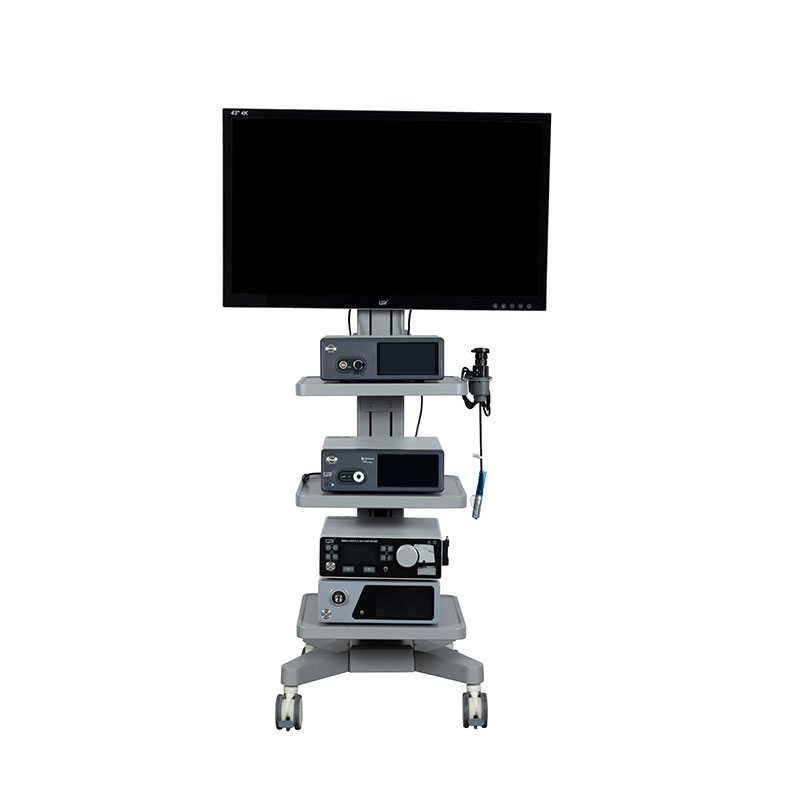
You must differentiate between native 4K CMOS sensors and software-upscaled systems. Native 4K sensors feature exactly 3840 x 2160 pixels on the chip. They capture genuine ultra-high-definition light data. Upscaled systems use standard HD sensors. They rely on software algorithms to artificially guess missing pixels. Upscaled images create a false sense of fidelity. They often look processed or unnaturally sharp. Native resolution profoundly impacts digital zoom capabilities. Surgeons rely on digital zoom during delicate micro-suturing. Upscaled systems quickly introduce heavy pixelation when zoomed. Native 4K maintains crisp edge details even under significant magnification.
Color reproduction standards dictate clinical visibility. Many legacy systems still use the older BT.709 color standard. You should look for systems supporting the BT.2020 color gamut. This wider spectrum allows for superior visualization of micro-vessels. It helps surgeons easily distinguish tiny nerve structures from surrounding fat. You must also assess proprietary image enhancement technologies. Some vendors offer selective color isolation. This feature proves invaluable for fluorescence imaging and ICG (Indocyanine Green) applications. It highlights specific vascular flows against dark anatomical backgrounds.
Here is a comparison of standard color gamuts in surgical environments:
Feature | BT.709 Standard | BT.2020 Standard |
|---|---|---|
Color Range | Narrower spectrum (HD standard) | Extremely wide spectrum (True 4K standard) |
Red Hues | Washed out, similar tones blend together | Deep, distinct shades of red |
Clinical Benefit | Adequate for basic anatomical navigation | Superior differentiation of micro-vessels and nerves |
System latency significantly impacts patient safety. Hand-eye coordination in minimally invasive surgery relies on instantaneous visual feedback. You must examine the glass-to-glass latency of the entire system. This metric measures the delay from the camera lens to the surgical monitor. The delay must remain entirely imperceptible to the human eye. Ideally, you want sub-20 milliseconds of latency. Anything higher causes a disconnect between hand movements and visual output. Furthermore, you must prioritize 60fps refresh rates. Slower 30fps systems introduce distracting motion blur. This blur becomes dangerous during rapid instrument manipulation.
Evaluate your Camera Control Unit interoperability carefully. Some vendors force you into a closed, brand-specific ecosystem. Their camera heads only work with their proprietary CCUs. This strategy locks your hospital into a single vendor for future upgrades. Other manufacturers offer cross-compatibility. They design systems to integrate seamlessly with universal surgical towers. You must assess whether the system plays well with your existing infrastructure. Open architectures provide greater flexibility. They protect your hospital from forced obsolescence cycles.
Camera systems rely heavily on illumination. You must verify how the camera communicates with your light source. This applies to both modern LED and legacy Xenon light sources. The camera and light source must synchronize their automatic exposure settings. Poor synchronization causes severe "blooming" or overexposure. This happens when the endoscope moves too close to highly reflective tissues. A synchronized system automatically dims the light output instantly. It preserves image clarity and prevents the surgeon from being temporarily blinded by glare.
Uncompressed 4K video requires massive data bandwidth. A typical 4K 60fps stream generates enormous files rapidly. You must evaluate the system's integration with your hospital's data routing infrastructure. Assess your current Video over IP (VoIP) capabilities. Determine if your network switches can handle the increased load. Furthermore, consider your PACS and EMR systems. Storing uncompressed 4K surgical recordings consumes server space rapidly. You need robust data compression protocols. Smooth EMR integration ensures seamless archiving of procedural videos for legal and training purposes.
Upgrading to 4K introduces physical challenges. Native 4K sensors process significantly more data. This heavy processing generates substantial heat. Manufacturers often build larger camera heads to improve heat dissipation. These heavier heads increase the physical burden on the surgeon. You must evaluate the physical weight of the camera head carefully. Test the cable drag during complex hand movements. Pay close attention to the button placement on the camera head. Poorly placed buttons force awkward finger stretching. This drastically increases surgeon hand fatigue during lengthy procedures.
Surgical equipment must survive harsh sterilization routines. You must thoroughly scrutinize the manufacturer’s validated sterilization modalities. High-heat and harsh chemicals quickly degrade delicate optical alignments. Your chosen system must withstand repeated cycles of your hospital's standard protocols. Check for strict compatibility with Autoclave (steam), STERRAD, or V-PRO systems. Look for common failure points. Optical degradation often occurs after 100 cycles in poorly sealed units. Moisture intrusion ruins electronic sensors instantly. Demand clear warranties regarding sterilization-induced damage.
Transmitting 4K data presents a severe physical challenge. You must address the physical reality of the cabling bottleneck. Fiber optic cables provide the massive bandwidth required for uncompressed 4K video. However, they are notoriously fragile. A simple bend can snap the internal glass fibers. Copper cables are highly durable and resist kinking. However, they remain much thicker and heavier. This extra weight increases cable drag on the sterile field. You must assess the durability and flexibility of the vendor's specific cable design.
Cabling Comparison Chart:
Cable Type | Bandwidth Capacity | Durability | Weight & Ergonomics |
|---|---|---|---|
Fiber Optic | Exceptional (Ideal for uncompressed 4K) | Fragile (Susceptible to bending damage) | Very light, minimal drag |
Copper | Adequate (May require some compression) | Highly Durable (Resists kinking) | Thicker and heavier, increases drag |
Do not evaluate surgical cameras in a conference room. Fluorescent lighting and test charts fail to replicate clinical reality. You must mandate live, in-vivo clinical trials. We strongly recommend testing the equipment across at least three different surgical specialties. Different specialties push the equipment in different ways. An effective OR demo requires strict guidelines:
Test the system during complex cases, not just routine procedures.
Ensure the vendor connects the camera to your actual hospital monitors.
Involve circulating nurses to test the setup and cabling processes.
Evaluate the system under varying levels of bleeding and smoke generation.
You cannot rely on anecdotal feedback. You must create a standardized evaluation scorecard. Distribute this scorecard to all participating surgeons and OR staff. Ask them to rate specific, measurable parameters. Evaluate the depth of field during deep cavity navigation. Assess low-light performance specifically during deep pelvic surgery. Rate the ease of white balancing before the procedure begins. Finally, score the ergonomic comfort of the camera head after a two-hour case. Standardized scoring prevents charismatic sales reps from skewing the trial results.
Excellent image quality means nothing if the camera stays in the repair shop. You must thoroughly analyze the vendor's post-purchase support structure. Investigate their loaner program availability. Will they overnight a replacement camera head if yours breaks? Demand clearly written guaranteed uptime metrics in the contract. Analyze the true cost of out-of-warranty camera head replacements. Some vendors subsidize the initial purchase but charge exorbitant fees for post-warranty repairs. Transparent service agreements protect your operational budget.
You must define strict criteria for moving forward. Narrow your options down to a top-three vendor shortlist. Base this initial cut entirely on the standardized clinical feedback. Once you establish clinical acceptability, move to final procurement negotiation. Focus heavily on financial viability, warranty terms, and infrastructure compatibility. Never let purchasing teams override strong clinical objections. Conversely, do not let surgeons demand equipment that breaks your IT infrastructure. Successful procurement requires balancing surgical needs with operational realities.
Selecting a modern visualization system is a critical infrastructure decision. It is not just a simple device purchase. The right equipment perfectly aligns high-fidelity visualization with your hospital's IT infrastructure. It must also survive your rigorous sterilization protocols. Following a structured evaluation process prevents costly procurement mistakes.
Here are your action-oriented next steps for a successful evaluation:
Demand Transparent Imaging: Prioritize vendors who offer true, native 4K sensors rather than upscaled HD approximations.
Map Your Ecosystem: Audit your current CCUs, light sources, and monitors before soliciting vendor bids.
Mandate Rigorous Trials: Conduct live, in-vivo clinical trials across multiple specialties using standardized scorecards.
Scrutinize Sterilization: Verify strict compatibility with your hospital's specific autoclave or chemical sterilization systems.
Negotiate Service Terms: Secure guaranteed uptime and clear out-of-warranty replacement costs before committing to a long-term contract.
A: Native 4K refers to sensors with exactly 3840 x 2160 physical pixels capturing light data. 4K UHD sometimes refers to broadcast standards where HD signals are software-upscaled to fit a 4K monitor. True native 4K matters greatly because it allows surgeons to use digital zoom without experiencing dangerous pixelation.
A: Yes. A 4K camera connected to a standard HD monitor will only display an HD image. The entire visualization chain must be 4K-compliant. This includes the camera head, the camera control unit, the cabling, and the surgical display monitor.
A: Uncompressed 4K video files are massive. They can be four times larger than standard HD recordings. This heavily impacts your server storage. You must ensure your hospital's PACS/EMR systems possess robust data compression capabilities and adequate server capacity to archive these large files.
A: It depends on the procedure. 4K offers vastly superior resolution, color differentiation, and zooming capabilities. 3D HD offers lower resolution but provides crucial depth perception. 4K is generally preferred for fine tissue differentiation, while 3D HD helps with spatial orientation during complex suturing tasks.


